I was reading blog where the guy was doing POC to cut cost on storage component and at the same time have good performance. Something which came across was VHBA. I thought what this new %@#&( is.? I googled and found best practice document from Emulex. It talks about NPIV which used to virtualizes NPIV. N_Port ID Virtualization (NPIV) technology virtualizes the LightPulse physical HBA port configured in a point-to-pointSAN topology. This HBA virtualization technology allows a single physical Fibre Channel HBA port to function as multiple logical ports, each with its own separate identity.Now, each virtual machine can attach to its own Virtual HBA port (or VPort) which consists of the combination of a distinct Worldwide Node Name (WWNN) and up to four Worldwide Port Names (WWPNs),
They have virtualizes storage/server/network and now HBA’s. What else is waiting now?
Tuesday, January 6, 2009


Happy blogging
I was inspired by my few Americans college/friend (yes I can claim them as my friend even
though they were my clients) and started blogging. Blogging gave me freedom to express myself and now I can see result of my blogging. Recently a site called DBCC has published my article about “How to troubleshoot P2Ved Citrix box”.
“One of the VM's was having some performance issue and I found that it was a citrix box which has been P2Ved . It was windows 2000 box and VMware converter was still installed. Who ever done the P2V did not uninstall the converter. Normally Citrix on VMware best practices suggest that you should never P2V. I started troubleshooting this box to find out what went wrong. I thought may be HAL is corrupted because it was showing 4 PROC. I tried running command systeminfo and it throws out the error that it does not recognize the command. Of course it does will not since it was win2K box. So here is the way.”
One of the VMware principal system engineer Mike D who run’s his own blog has put my blog under the list of “Great Bloggers ”.
One of the Linked discussion which I also publish it on my blog . For my solution the discussion initiator has wrote comment
Thanks for your detailed reply. It was an absolute gem. I would like to add you to my
network and am sending invite. Please accept.
Thanks
Satyaprakash
Having said all above it makes me happy that my good work is recognized by technical geeks.
Thank you all for your encouragement and I will keep improving
Wednesday, December 31, 2008
IE security setting was grayed out
I was not able to edit my IE setting for “trusted” site. IE was harden to the core for any type of editing
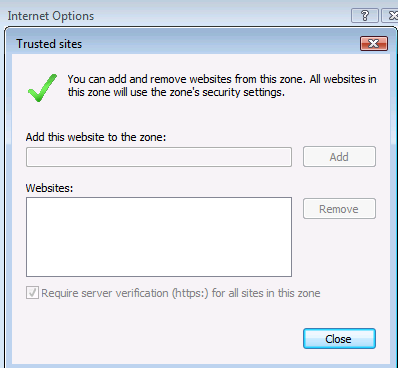
Google helped me ☺
-
Close all IE windows.
-
Start > Run > (type in) “regedit” > [OK]
-
Navigate to/See if you have the following key... HKEY_LOCAL_MACHINE\Software\Policies\Microsoft\Windows\CurrentVersion\Internet Settings
If it's not found, STOP
-
If it's found, select (highlight) the key then look in the right pane: Is there a DWORD value of "Security_Zones_Map_Edit" or "Security_HKLM_only" (without the quotes)?
If not, STOP
-
If so, right-click on the key (in left pane) > Select "Export" & save the file to your desktop (to back up the key for safety's sake).
-
Now, right-click on the same key again > Select "Delete" > Close “regedit” then reboot your machine.
But my problem did not stopped here I have added wrong URL under “trusted ” sites and I was getting error message "The site you specified already exists in another zone. Please remove the site from that zone before adding it to the current zone."
Now what to do ? Almost all the sites which get added into “trusted” sites are listed under
HKEY_LOCAL_MACHINE\Software\Microsoft\Windows\CurrentVersion\Internet Settings\ZoneMap\Domains
Deleted the key and then I was able to update the “trusted” sites entry
Thank You Google
Thursday, December 18, 2008
Tuesday, December 16, 2008
First Cut for ESXi3 5 update3 released
Downloaded latest ESXi version: 3.5 Update 3 | 2008/11/06 | Build: 123629. Not to mention that again VMware has done wonderful job in releasing their updates. This kind of work gives me enough reason to believe that removal of Diane Greene cannot downgrade VMware reputation.
I downloaded HP version as I was using HP DL 380 as my host.
When I mounted ISO using ILO and rebooted my server it did not gave me option to install GUI as earlier updates use to do ,instead of that it says “LOADING ISO” and once ISO is loaded it will give default option like this
1. ELA where you have to accept the license
2. It will search for previous install of ESX
3. It will give warning message like your disk will be formatted and stuff like that
But it will not do anything other than that. I was surprised how do I then configure my system. So here is the answer:
1. Remove the ILO mount and then reboot the system.
2. When the system comes back it will allow you to configure the system. Press F2 then it will provide you the option to specify
When you press F12 to reboot it gives you option if you want to shutdown or restart. I love this feature
When you leave the screen just like that for a while then it will turn black
While rebooting it will present a nice looking GUI

I LOVE VMWare
Subscribe to:
Posts (Atom)


 Posts
Posts



